CLOUD PBX
Unifica llamadas, equipos y sucursales en una sola experiencia inteligente, sin infraestructura ni límites físicos. Control total, continuidad y conexión desde cualquier lugar.
Funcionalidades
Cloud PBX no solo permite que las empresas reduzcan costos en llamadas y equipamiento, también les brinda la posibilidad de mejorar su productividad al contar con herramientas de comunicación más avanzadas y eficientes.
- Operadora Automática (sin restriccion de canales)
- Audio de alta definición con cancelación de eco
- Monitoreo en tiempo real
- Sigueme
- Llamada de espera
- Identificador de llamadas
- Correo de Fax
- Correo de Voz (sin restriccion de canales)
- Marcación por directorio por nombre
- Panel Web de Administración
- Grabación de llamadas
- Soporte multilenguaje
- Notificaciones vía correo electrónico
- Salas de audio conferencia
- Timbrado simultaneo.
- Cola de llamadas
- Grupos de captura
- Grupos de timbrado
- Parqueo de llamada
- Personalizacion de musica en espera
- Encriptación para llamadas seguras
- Crecimiento modular basado en software.
- No requiere inversiones adicionales de licenciamiento.
Dispositivos
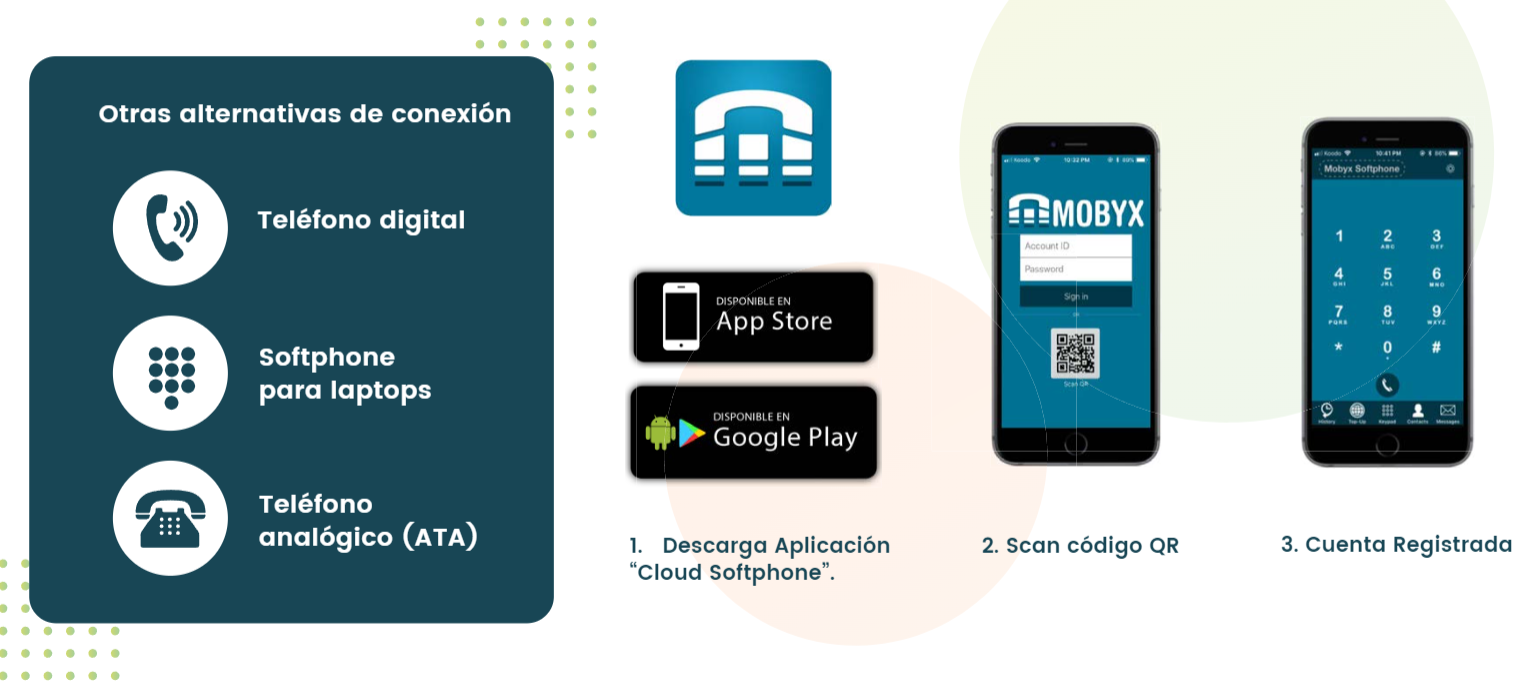
La aplicación móvil Cloud Softphone permite realizar y recibir llamadas desde cualquier dispositivo móvil utilizando la extensión telefónica del usuario. Está disponible para iOS y Android, y su activación se realiza en 3 pasos: descarga de la aplicación, escaneo de código QR y registro automático de la cuenta.Como parte de la solución, existen otras alternativas de conexión como teléfono digital, softphone para laptops y teléfono analógico mediante ATA.
Infraestructura
Arquitectura
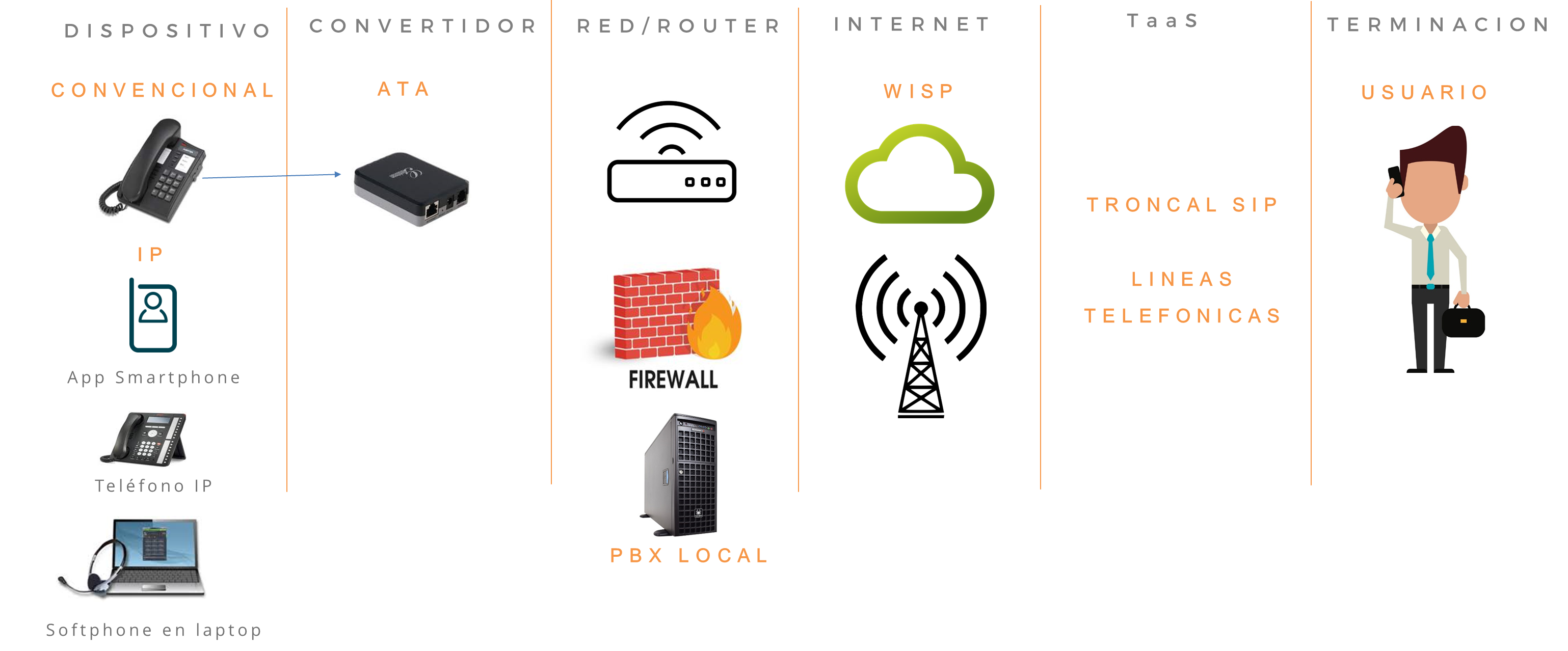
El siguiente diagrama muestra el flujo de la comunicación telefónica IP. El servicio inicia desde diferentes Dispositivos: teléfono convencional, App en Smartphone, Teléfono IP o Softphone en laptop. Los dispositivos convencionales se conectan a través de un Convertidor ATA para digitalizar la señal. Todo el tráfico pasa por la Red/Router del cliente, donde puede existir Firewall o PBX Local, y sale a Internet mediante un proveedor WISP u otro enlace.La plataforma de Telefonía como Servicio (TaaS) gestiona la Troncal SIP y las líneas telefónicas, permitiendo la Terminación de llamadas hacia el Usuario final en la red pública.
Requerimientos Tecnicos Locales
Red
Para implementar un PBX en un servidor local, es necesario contar con los siguientes requerimientos mínimos:
- Espacio físico para la instalacion de servidor en cuanto de telecomunicaciones con acceso restringuido y clima controlado
- 1 contacto electrico regulado y proteguido
- 1 puerto de red
- 1 IP pública fija
- Trafico SIP abierto con puerto 5060
- VPN para acceso remoto (opcional)
Servidor
-
Procesador: Intel® Xeon® E7-8893 v4 . 3.2 Ghz
-
Memoria: 16 GB RAM
-
Disco: capacidad 1TB (Raid 1) – 10K RPM (recomendado) o superior
-
Controladora: Raid 0/1/10 (software)
-
LAN: 100/1000 MB (Dual)
-
Compatible con Ubuntu Linux
Almacenamiento de Grabaciones

Preguntas frecuentes
Preguntas frecuentes
¿Qué es Cloud PBX?
Es un conmutador telefónico en la nube que permite gestionar llamadas empresariales sin necesidad de instalar equipo físico en sitio. Todo se administra por internet desde cualquier ubicación.
¿Qué ventajas tiene vs un PBX tradicional?
Se divide en 4 áreas clave:
- Infraestructura: Contratas todo con un solo proveedor. Menos complejidad, tiempos de respuesta más rápidos y gestión simplificada.
- Operación: Tu personal se enfoca en el negocio. La tecnología, mantenimiento y actualizaciones corren por nuestra cuenta. Además, puedes activar o desactivar servicios según tu demanda.
- Tecnología: Evitas obsolescencia.Siempre usas tecnología actualizada sin riesgo de inversión en hardware que se devalúa.
- Economía: Mínima inversión inicial en equipamiento. El gasto es operativo y se deprecia de inmediato. Sin contratos forzosos.
¿Necesito comprar equipos caros?
No. Puedes usar la App Cloud Softphone en tu celular, softphone en laptop o adaptar teléfonos convencionales con un ATA. La inversión en hardware es mínima.
¿Qué pasa si mi negocio crece o se reduce?
La solución es flexible. Agregas o quitas extensiones y servicios bajo demanda, pagando solo lo que usas.
¿Quién se encarga del mantenimiento?
Nosotros. Al ser un servicio en la nube, actualizaciones, seguridad y soporte técnico están incluidos. Tu equipo no se preocupa por fallas ni obsolescencia.
¿Hay plazos forzosos?
No. La contratación es flexible y sin contratos forzosos, adaptándose a las necesidades de tu operación.