# SMS / WAB

#### SMS/Whatsapp Providers<span class="heading-anchor-wrapper" role="presentation"><button aria-hidden="true" class="css-x4slh0" data-testid="anchor-button" type="button"><span aria-label="Copy" class="_3iDTPbvbI6 _24h04i2Njc _3YEZNOdnbC _26BoRw7dHp _03SyCPU7Rg _0LQT5ECyim _2z3AMPTxK4 _1hdADdMFyn" role="img"><svg class="_4bt5LAnQyn _2WAcuGnQyn _1UtDYz98eZ _1pp6NdYbGa _1RrJLiUWqv _24fbFs98eZ _39xV025zaO _0jFU0V5zaO" fill="none" role="presentation" viewbox="0 0 16 16"><path clip-rule="evenodd" d="M8.22 2.22a3.932 3.932 0 1 1 5.56 5.56l-2.25 2.25-1.06-1.06 2.25-2.25a2.432 2.432 0 0 0-3.44-3.44L7.03 5.53 5.97 4.47zm3.06 3.56-5.5 5.5-1.06-1.06 5.5-5.5zM2.22 8.22l2.25-2.25 1.06 1.06-2.25 2.25a2.432 2.432 0 0 0 3.44 3.44l2.25-2.25 1.06 1.06-2.25 2.25a3.932 3.932 0 1 1-5.56-5.56" fill="currentcolor" fill-rule="evenodd"></path></svg></span></button></span>

For more information on the creation of SMS or Whatsapp providers, go to the corresponding pages: <span class="_0wOv4QAxrc _3iDTPbS8kF" data-testid="smart-link-draggable-inline"><span data-annotation-inline-node="true" data-annotation-mark="true" data-card-url="https://integra-scm.atlassian.net/wiki/spaces/UCEN/pages/407680333" data-inline-card="true" data-renderer-start-pos="295"><span class="css-bjn8wh"><span class="loader-wrapper"><span class="hover-card-trigger-wrapper" data-testid="hover-card-trigger-wrapper" role="none">[<span class="_30huDKYbGa _24h04i2Njc _034jHtYbGa _1ANEUSlpBW _3W2Oc84hR5 _2NnhnEXpc7 _0Of8r2FQfX _1Znuxb1Y8M _1wydGWFQfX _2Zuz6Q1Y8M" data-testid="inline-card-icon-and-title"><span class="_30huDKYbGa _24h04i2Njc _034jHtYbGa">SMS</span></span>](https://integra-scm.atlassian.net/wiki/spaces/UCEN/pages/407680333)</span></span></span></span></span> <span class="_0wOv4QAxrc _3iDTPbS8kF" data-testid="smart-link-draggable-inline"><span data-annotation-inline-node="true" data-annotation-mark="true" data-card-url="https://integra-scm.atlassian.net/wiki/spaces/UCEN/pages/2388558151" data-inline-card="true" data-renderer-start-pos="297"><span class="css-bjn8wh"><span class="loader-wrapper"><span class="hover-card-trigger-wrapper" data-testid="hover-card-trigger-wrapper" role="none">[<span class="_30huDKYbGa _24h04i2Njc _034jHtYbGa _1ANEUSlpBW _3W2Oc84hR5 _2NnhnEXpc7 _0Of8r2FQfX _1Znuxb1Y8M _1wydGWFQfX _2Zuz6Q1Y8M" data-testid="inline-card-icon-and-title"><span class="_30huDKYbGa _24h04i2Njc _034jHtYbGa">Whatsapp APIs</span></span>](https://integra-scm.atlassian.net/wiki/spaces/UCEN/pages/2388558151)</span></span></span></span></span>

##### SMS/Whatsapp Campaigns<span class="heading-anchor-wrapper" role="presentation"><button aria-hidden="true" class="css-x4slh0" data-testid="anchor-button" type="button"><span aria-label="Copy" class="_3iDTPbvbI6 _24h04i2Njc _3YEZNOdnbC _26BoRw7dHp _03SyCPU7Rg _0LQT5ECyim _2z3AMPTxK4 _1hdADdMFyn" role="img"><svg class="_4bt5LAnQyn _2WAcuGnQyn _1UtDYz98eZ _1pp6NdYbGa _1RrJLiUWqv _24fbFs98eZ _39xV025zaO _0jFU0V5zaO" fill="none" role="presentation" viewbox="0 0 16 16"><path clip-rule="evenodd" d="M8.22 2.22a3.932 3.932 0 1 1 5.56 5.56l-2.25 2.25-1.06-1.06 2.25-2.25a2.432 2.432 0 0 0-3.44-3.44L7.03 5.53 5.97 4.47zm3.06 3.56-5.5 5.5-1.06-1.06 5.5-5.5zM2.22 8.22l2.25-2.25 1.06 1.06-2.25 2.25a2.432 2.432 0 0 0 3.44 3.44l2.25-2.25 1.06 1.06-2.25 2.25a3.932 3.932 0 1 1-5.56-5.56" fill="currentcolor" fill-rule="evenodd"></path></svg></span></button></span>

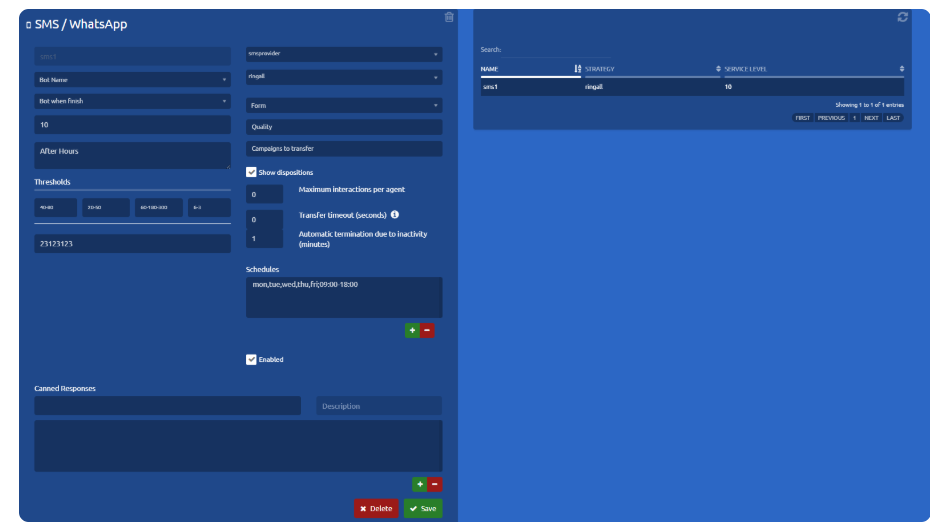
After creating the provider, we can start creating SMS/Whatsapp campaigns.

[![image.png](https://docs.cleverideas.ai/uploads/images/gallery/2026-08/scaled-1680-/OAlokmAoEmvDTncB-image.png)](https://docs.cleverideas.ai/uploads/images/gallery/2026-08/OAlokmAoEmvDTncB-image.png)
### Basic settings<span class="heading-anchor-wrapper" role="presentation"><button aria-hidden="true" class="css-x4slh0" data-testid="anchor-button" type="button"><span aria-label="Copy" class="_3iDTPbvbI6 _24h04i2Njc _3YEZNOdnbC _26BoRw7dHp _03SyCPU7Rg _0LQT5ECyim _2z3AMPTxK4 _1hdADdMFyn" role="img"><svg class="_4bt5LAnQyn _2WAcuGnQyn _1UtDYz98eZ _1pp6NdYbGa _1RrJLiUWqv _24fbFs98eZ _39xV025zaO _0jFU0V5zaO" fill="none" role="presentation" viewbox="0 0 16 16"><path clip-rule="evenodd" d="M8.22 2.22a3.932 3.932 0 1 1 5.56 5.56l-2.25 2.25-1.06-1.06 2.25-2.25a2.432 2.432 0 0 0-3.44-3.44L7.03 5.53 5.97 4.47zm3.06 3.56-5.5 5.5-1.06-1.06 5.5-5.5zM2.22 8.22l2.25-2.25 1.06 1.06-2.25 2.25a2.432 2.432 0 0 0 3.44 3.44l2.25-2.25 1.06 1.06-2.25 2.25a3.932 3.932 0 1 1-5.56-5.56" fill="currentcolor" fill-rule="evenodd"></path></svg></span></button></span>

- **Name**  
    Name to identify the SMS/Whatsapp campaign.
- **Service level**  
    The service level is the percentage of interactions that were attended/abandoned by the agent before/after a stipulated time limit.
- **DID-Ports**  
    In this field, you must enter a code (telephone number, alphanumeric, id, etc.) associated with the campaign for identification purposes. Generally, this information is provided by the provider and may vary.
- **SMS provider**  
    Clicking on the combo displays a list of all the SMS/Whatsapp providers that are registered in the system.
- **Strategy**  
    It is the behavior that the campaign will have. To learn more about the different strategies go to [Strategies - Omnichannel.](https://integra-scm.atlassian.net/l/c/zCdccjip "https://integra-scm.atlassian.net/l/c/zCdccjip")
- **Schedule**  
    The hours in which the SMS campaign will be available, that is, with agents available to answer customer SMS. To add a schedule configuration you must add with the '+' button and a new window will appear or remove a selected one from the list with the '-' button.

[![image.png](https://docs.cleverideas.ai/uploads/images/gallery/2026-08/scaled-1680-/hstjfomNUbJq18Op-image.png)](https://docs.cleverideas.ai/uploads/images/gallery/2026-08/hstjfomNUbJq18Op-image.png)

### Advanced settings<span class="heading-anchor-wrapper" role="presentation"><button aria-hidden="true" class="css-x4slh0" data-testid="anchor-button" type="button"><span aria-label="Copy" class="_3iDTPbvbI6 _24h04i2Njc _3YEZNOdnbC _26BoRw7dHp _03SyCPU7Rg _0LQT5ECyim _2z3AMPTxK4 _1hdADdMFyn" role="img"><svg class="_4bt5LAnQyn _2WAcuGnQyn _1UtDYz98eZ _1pp6NdYbGa _1RrJLiUWqv _24fbFs98eZ _39xV025zaO _0jFU0V5zaO" fill="none" role="presentation" viewbox="0 0 16 16"><path clip-rule="evenodd" d="M8.22 2.22a3.932 3.932 0 1 1 5.56 5.56l-2.25 2.25-1.06-1.06 2.25-2.25a2.432 2.432 0 0 0-3.44-3.44L7.03 5.53 5.97 4.47zm3.06 3.56-5.5 5.5-1.06-1.06 5.5-5.5zM2.22 8.22l2.25-2.25 1.06 1.06-2.25 2.25a2.432 2.432 0 0 0 3.44 3.44l2.25-2.25 1.06 1.06-2.25 2.25a3.932 3.932 0 1 1-5.56-5.56" fill="currentcolor" fill-rule="evenodd"></path></svg></span></button></span>

These parameters already have a default value for the correct operation of the campaign.

To know more go to[ Important Concepts - Omnichannel.](https://integra-scm.atlassian.net/l/c/xr6Gw2aP "https://integra-scm.atlassian.net/l/c/xr6Gw2aP")

**Out of time**  
This will be the message that will be sent to the client if he sends a message while the campaign is out of hours.

**Thresholds**  
These are metrics to carry out the statistics of the campaigns in real-time, they are measured in time (seconds).

- **Service level**  
    It is the expected time limit for the response of the chats by an agent.
- **Churn rate**   
    It is the elapsed time of chats to consider that they were abandoned by customers during the day.
- **Chat time**  
    Time elapsed to consider that the chat between agent and client reached the limit.
- **ACD**  
    The maximum number of customers waiting to be answered by a chat agent.

**Maximum interactions by agent**   
Limits the number of active interactions an agent can have. The remaining interactions are queued. It is only used for nocall strategies.

#### **Automatic termination due to inactivity (minutes):**<span class="heading-anchor-wrapper" role="presentation"><button aria-hidden="true" class="css-x4slh0" data-testid="anchor-button" type="button"><span aria-label="Copy" class="_3iDTPbvbI6 _24h04i2Njc _3YEZNOdnbC _26BoRw7dHp _03SyCPU7Rg _0LQT5ECyim _2z3AMPTxK4 _1hdADdMFyn" role="img"><svg class="_4bt5LAnQyn _2WAcuGnQyn _1UtDYz98eZ _1pp6NdYbGa _1RrJLiUWqv _24fbFs98eZ _39xV025zaO _0jFU0V5zaO" fill="none" role="presentation" viewbox="0 0 16 16"><path clip-rule="evenodd" d="M8.22 2.22a3.932 3.932 0 1 1 5.56 5.56l-2.25 2.25-1.06-1.06 2.25-2.25a2.432 2.432 0 0 0-3.44-3.44L7.03 5.53 5.97 4.47zm3.06 3.56-5.5 5.5-1.06-1.06 5.5-5.5zM2.22 8.22l2.25-2.25 1.06 1.06-2.25 2.25a2.432 2.432 0 0 0 3.44 3.44l2.25-2.25 1.06 1.06-2.25 2.25a3.932 3.932 0 1 1-5.56-5.56" fill="currentcolor" fill-rule="evenodd"></path></svg></span></button></span>

  
This setting allows you to configure the inactivity timeout (in minutes) after which an interaction will be automatically terminated. The timer starts **only when an agent has the interaction assigned**.  
If the interaction is in a queue (for example, in a campaign) or is being transferred, the timeout does not run. Once the interaction is attended again, the inactivity timer resets to zero.  
The same applies to incoming interactions: the inactivity timer begins only when an agent starts handling the interaction, **not** when it enters the queue.  
If the configured value is 0, automatic termination is disabled, meaning interactions will not be automatically closed due to inactivity.

**Campaigns to Transfer:** At this point, one or more campaigns can be selected; these will be the only ones to which generated interactions can be transferred. If none are specifically selected, transfers will be allowed to all campaigns. Additionally, dialers can also be selected. Selecting a dialer as a “campaign to transfer” does not enable transferring interactions to the dialersthemselves. However, when both settings — “Historic interactions from all campaigns” and “Show only campaigns available for transfer” — are enabled, the active interaction history will also load messages sent by the dialers selected as “campaigns for transfer” when loading previous messages.

**Enabled**  
The system can have a campaign registered that is not running without having to delete it completely, in this way the supervisor will not lose relevant data. If it is checked, the campaign can be used.

**Pre-setted responses**  
The campaign may have pre-written responses, which makes it easier and faster for the agent to interact with the customer.