# SMS/Whatsapp

The incorporation of SMS/Whatsapp to our service contributes exponentially to the improvement of the customer experience.

## SMS campaigns<button aria-label="Copy link to heading" class="css-779anb"><svg height="24" role="presentation" viewbox="0 0 24 24" width="24"></svg></button>

After creating the provider, we can start creating SMS campaigns.

<div class="rich-media-item mediaSingleView-content-wrap image-center css-1mzi1es" data-layout="center" data-node-type="mediaSingle" id="bkmrk-"><div class="rich-media-item mediaSingleView-content-wrap image-center css-1mzi1es" data-layout="center" data-node-type="mediaSingle"><div class="css-1jgvy8y"><div data-alt="" data-collection="contentId-407680333" data-context-id="407680333" data-file-mime-type="image/jpeg" data-file-name="Captura de Pantalla 2021-11-18 a la(s) 10.21.27.jpg" data-file-size="122829" data-height="1800" data-id="cf3ad05b-ee7d-406d-8aad-475f26ec9fe1" data-node-type="media" data-type="file" data-width="2880"><div class="new-file-experience-wrapper css-29b3bc" data-testid="media-card-view"><div class="media-file-card-view css-1yn77bd" data-test-media-name="Captura de Pantalla 2021-11-18 a la(s) 10.21.27.jpg" data-test-progress="1" data-test-status="complete" data-testid="media-file-card-view">![](blob:https://integra-scm.atlassian.net/1dad32d3-79d0-44bd-bd6e-c028cecc1294#media-blob-url=true&id=cf3ad05b-ee7d-406d-8aad-475f26ec9fe1&collection=contentId-407680333&contextId=407680333&mimeType=image%2Fjpeg&name=Captura%20de%20Pantalla%202021-11-18%20a%20la(s)%2010.21.27.jpg&size=122829&height=1800&width=2880&alt=)</div></div></div></div></div></div>[![image-1674581529791.png](https://docs.cleverideas.com.mx/uploads/images/gallery/2023-01/scaled-1680-/FhNmCTSiS0Ilydd5-image-1674581529791.png)](https://docs.cleverideas.com.mx/uploads/images/gallery/2023-01/FhNmCTSiS0Ilydd5-image-1674581529791.png)

### Basic settings<button aria-label="Copy link to heading" class="css-779anb"><svg height="24" role="presentation" viewbox="0 0 24 24" width="24"></svg></button>

- **Name**  
    Name to identify the SMS campaign.
- **Service level**  
    The service level is the percentage of interactions that were attended/abandoned by the agent before/after a stipulated time limit.
- **DID-Ports**  
    In this field, you must enter a code (telephone number, alphanumeric, id, etc.) associated with the campaign for identification purposes. Generally, this information is provided by the provider and may vary.
- **SMS provider**  
    Clicking on the combo displays a list of all the SMS providers that are registered in the system.
- **Strategy**  
    It is the behavior that the campaign will have. To learn more about the different strategies go to [Strategies - Omnichannel.](https://integra-scm.atlassian.net/l/c/zCdccjip "https://integra-scm.atlassian.net/l/c/zCdccjip")
- **Schedule**  
    The hours in which the SMS campaign will be available, that is, with agents available to answer customer SMS. To add a schedule configuration you must add with the '+' button and a new window will appear or remove a selected one from the list with the '-' button.

After saving your settings, you will see your campaign in the table on the right where you will find all the campaigns created in the system listed according to your security group.

### Advanced settings<button aria-label="Copy link to heading" class="css-779anb"><svg height="24" role="presentation" viewbox="0 0 24 24" width="24"></svg></button>

These parameters already have a default value for the correct operation of the campaign.

To know more go to[ Important Concepts - Omnichannel.](https://integra-scm.atlassian.net/l/c/xr6Gw2aP "https://integra-scm.atlassian.net/l/c/xr6Gw2aP")

**Out of time**  
This will be the message that will be sent to the client if he sends a message while the campaign is out of hours.

**Thresholds**  
These are metrics to carry out the statistics of the campaigns in real-time, they are measured in time (seconds).

- **Service level**  
    It is the expected time limit for the response of the chats by an agent.
- **Churn rate**   
    It is the elapsed time of chats to consider that they were abandoned by customers during the day.
- **Chat time**  
    Time elapsed to consider that the chat between agent and client reached the limit.
- **ACD**  
    The maximum number of customers waiting to be answered by a chat agent.

**Maximum interactions by agent**   
Limits the number of active interactions an agent can have. The remaining interactions are queued. It is only used for nocall strategies.

**Enabled**  
The system can have a campaign registered that is not running without having to delete it completely, in this way the supervisor will not lose relevant data. If it is checked, the campaign can be used.

**Pre-setted responses**  
The campaign may have pre-written responses, which makes it easier and faster for the agent to interact with the customer.

## How to add or delete members?<button aria-label="Copy link to heading" class="css-779anb"><svg height="24" role="presentation" viewbox="0 0 24 24" width="24"></svg></button>

To add or remove agents to campaigns, the user must go to the Members section on the upper left.

[![image-1674581557761.png](https://docs.cleverideas.com.mx/uploads/images/gallery/2023-01/scaled-1680-/UlbNHqUSoAds0lSa-image-1674581557761.png)](https://docs.cleverideas.com.mx/uploads/images/gallery/2023-01/UlbNHqUSoAds0lSa-image-1674581557761.png)

### Add member<button aria-label="Copy link to heading" class="css-779anb"><svg height="24" role="presentation" viewbox="0 0 24 24" width="24"></svg></button>

1. In the Campaigns column, you can select one or more campaigns from which you want to add or remove members.
2. We select one or more agents from the Agents column and press Add.
3. In the Members column we will see the agents added to the campaign.

<p class="callout warning">**IMPORTANT** The members that are added to the campaign must be previously in a voice campaign, otherwise, the agents will not receive interactions of this type.</p>

## SMS dialer<button aria-label="Copy link to heading" class="css-779anb"><svg height="24" role="presentation" viewbox="0 0 24 24" width="24"></svg></button>

Allows you to send SMS in bulk.

For all dialers, an execution time range will be associated that will dictate the hours and days in which they will be run in order not to carry out actions at improper hours.

[![image-1674581626848.png](https://docs.cleverideas.com.mx/uploads/images/gallery/2023-01/scaled-1680-/vQbmOmCekLEp4RvO-image-1674581626848.png)](https://docs.cleverideas.com.mx/uploads/images/gallery/2023-01/vQbmOmCekLEp4RvO-image-1674581626848.png)
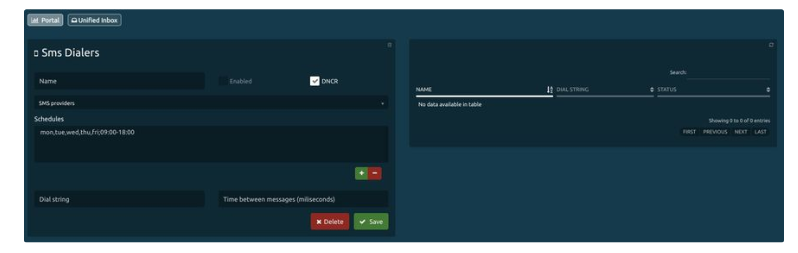
### Basic settings<button aria-label="Copy link to heading" class="css-779anb"><svg height="24" role="presentation" viewbox="0 0 24 24" width="24"></svg></button>

To create our SMS dialer we enter:

- **Name**  
    In order to identify our marker.
- **SMS providers**  
    That will be used to send messages.
- **Schedules**  
    The schedule in which the dialer will send messages is defined.
- **Dial string**  
    Based on the API that SMS sends, a port or range can be configured.
    
    
    - **Dinstar - DinstarWeb**  
        Channel range log, example: (0.3) this means that the message will be sent to 4 channels recursively (0-1-2-3-0 ...).
    - **Quality**  
        It does not need a dial string.
    - **Twilio**  
        It does not need a dial string.
- **Time between messages**  
    It is the time that the marker takes to send messages simultaneously, it is expressed in milliseconds.

### Optional parameters<button aria-label="Copy link to heading" class="css-779anb"><svg height="24" role="presentation" viewbox="0 0 24 24" width="24"></svg></button>

- **Enabled**  
    Indicates the status of the dialer, if it is active or not.
- **DNCR**   
    Allows you to enable the review of the **Blacklists** registry, for phone numbers that should not be called or sent messages.

### SMS dialer operation<button aria-label="Copy link to heading" class="css-779anb"><svg height="24" role="presentation" viewbox="0 0 24 24" width="24"></svg></button>

Basically, it works in a similar way to the rest of the markers we have, 50 messages from state 1 from the sms\_spool table are put in memory ordered by their entry position, it is fixed if it is in the black\_list, if it does not send it and puts it in state 3.

**States**

STATE: 0 NONE  
STATE: 1 TO PROCESS  
STATE: 3 BLOCKED

Example of CSV base to be uploaded to the dialer.

<div class="code-block  css-iwznuw" id="bkmrk-1campign%3Bdestiny%3Bmen"><div><div role="presentation"><div><button aria-haspopup="true" aria-label="Copy" class="copy-to-clipboard css-1pakopx" tabindex="0" type="button"><svg height="24" role="presentation" viewbox="0 0 24 24" width="24"></svg></button>  
</div></div></div><span class="prismjs css-rwxs72" data-code-lang="" data-ds--code--code-block="">`<span class="comment linenumber react-syntax-highlighter-line-number">1</span><span class="">campign;destiny;menssage;priority</span>`</span></div>For the given campaign:

<div class="pm-table-container with-shadow-observer" data-layout="default" id="bkmrk-campaign-destiny-mes"><div class="pm-table-wrapper"><div class="sentinel-left">  
</div><table data-number-column="false"><colgroup><col></col><col></col><col></col><col></col><col></col><col></col></colgroup><tbody><tr><td colspan="1" data-colwidth="113.33" rowspan="1">Campaign

</td><td colspan="1" data-colwidth="113.33" rowspan="1">Destiny

</td><td colspan="1" data-colwidth="113.33" rowspan="1">Message

</td><td colspan="1" data-colwidth="113.33" rowspan="1">Device

</td><td colspan="1" data-colwidth="113.33" rowspan="1">idm

</td><td colspan="1" data-colwidth="113.33" rowspan="1">data

</td></tr><tr><td colspan="1" data-colwidth="113.33" rowspan="1">test1

</td><td colspan="1" data-colwidth="113.33" rowspan="1">098344484

</td><td colspan="1" data-colwidth="113.33" rowspan="1">This is my SMS

</td><td colspan="1" data-colwidth="113.33" rowspan="1">Dinstar

</td><td colspan="1" data-colwidth="113.33" rowspan="1">autonumerico

</td><td colspan="1" data-colwidth="113.33" rowspan="1">extra data

</td></tr></tbody></table>

<div class="sentinel-right">  
</div></div></div>Our base would be:

<div class="code-block  css-iwznuw" id="bkmrk-1test1%3B098344484%3Bthi"><div><div role="presentation"><div><button aria-haspopup="true" aria-label="Copy" class="copy-to-clipboard css-1pakopx" tabindex="0" type="button"><svg height="24" role="presentation" viewbox="0 0 24 24" width="24"></svg></button>  
</div></div></div><span class="prismjs css-rwxs72" data-code-lang="" data-ds--code--code-block="">`<span class="comment linenumber react-syntax-highlighter-line-number">1</span><span class="">test1;098344484;This is my SMS;9999</span>`</span></div>**WebService**

<div class="code-block  css-iwznuw" id="bkmrk-1post-2http%3A%2F%2Fintegr"><div><div role="presentation"><div><button aria-haspopup="true" aria-label="Copy" class="copy-to-clipboard css-1pakopx" tabindex="0" type="button"><svg height="24" role="presentation" viewbox="0 0 24 24" width="24"></svg></button>  
</div></div></div><span class="prismjs css-rwxs72" data-code-lang="" data-ds--code--code-block="">`<span class="comment linenumber react-syntax-highlighter-line-number">1</span><span class="">POST</span><span class="comment linenumber react-syntax-highlighter-line-number">2</span>http://INTEGRASERVER/Integra/resources/SMS/SendSMS<span class="comment linenumber react-syntax-highlighter-line-number">3</span>  <span class="comment linenumber react-syntax-highlighter-line-number">4</span>params:<span class="comment linenumber react-syntax-highlighter-line-number">5</span>@FormParam("destination"), <span class="comment linenumber react-syntax-highlighter-line-number">6</span>@FormParam("message"), <span class="comment linenumber react-syntax-highlighter-line-number">7</span>@FormParam("campaign"), <span class="comment linenumber react-syntax-highlighter-line-number">8</span>@FormParam("agent")`</span></div>**Take note!**

<div class="ak-editor-panel css-d4tzhg" data-panel-type="success" id="bkmrk-to-start-a-dialer-it"><div class="ak-editor-panel__content">- To start a dialer it must be previously Enabled.
- In the Dropbox Providers, one of the created SMS providers is selected, this allows us to associate a different provider for each dialer.

</div></div>---

# SMS agent<button aria-label="Copy link to heading" class="css-779anb"><svg height="24" role="presentation" viewbox="0 0 24 24" width="24"></svg></button>

The agent has different interactions in his inbox and can search for them by campaign name or username.

When opened, it is displayed on the right side of the screen and shows customer interaction and information at the top.

- SMS campaign name.
- Customers' number.

<div class="rich-media-item mediaSingleView-content-wrap image-center css-1mzi1es" data-layout="center" data-node-type="mediaSingle" id="bkmrk--4"><div class="rich-media-item mediaSingleView-content-wrap image-center css-1mzi1es" data-layout="center" data-node-type="mediaSingle"><div class="css-rasvut"><div data-alt="" data-collection="contentId-407680333" data-context-id="407680333" data-file-mime-type="image/jpeg" data-file-name="image (2).jpg" data-file-size="22381" data-height="792" data-id="0f28da92-e937-4a2b-b261-3691d260e8b8" data-node-type="media" data-type="file" data-width="1812"><div class="new-file-experience-wrapper css-6xhdt5" data-testid="media-card-view"><div class="media-file-card-view css-1yn77bd" data-test-media-name="image (2).jpg" data-test-progress="1" data-test-status="complete" data-testid="media-file-card-view">![](blob:https://integra-scm.atlassian.net/22122a65-bb55-4f3a-9072-4937fb445ed8#media-blob-url=true&id=0f28da92-e937-4a2b-b261-3691d260e8b8&collection=contentId-407680333&contextId=407680333&mimeType=image%2Fjpeg&name=image%20(2).jpg&size=22381&height=792&width=1812&alt=)</div></div></div></div></div></div>[![image-1674581655449.png](https://docs.cleverideas.com.mx/uploads/images/gallery/2023-01/scaled-1680-/b5QlLCGUaXvt5Efc-image-1674581655449.png)](https://docs.cleverideas.com.mx/uploads/images/gallery/2023-01/b5QlLCGUaXvt5Efc-image-1674581655449.png)

[![image-1674581676042.png](https://docs.cleverideas.com.mx/uploads/images/gallery/2023-01/scaled-1680-/niwJKilt8C9LEttS-image-1674581676042.png)](https://docs.cleverideas.com.mx/uploads/images/gallery/2023-01/niwJKilt8C9LEttS-image-1674581676042.png)

### Interaction options<button aria-label="Copy link to heading" class="css-779anb"><svg height="24" role="presentation" viewbox="0 0 24 24" width="24"></svg></button>

Next to the box where the agent will respond to the client, it contains certain icons that allow us to access the following options:

- With the first one, a list with emojis is displayed to use in the messages.
- The following contains the predesigned responses for the campaign. These are inserted automatically once the user has selected them.
- The last button sends the message that the Agent is writing.
- In the upper right corner, the agent will find a three-dot icon, with which the customer's previous messages can be displayed.

You can also send SMS using the softphone integrated into the portal.

---

# SMS monitorin

Here you can see the real-time statistics of the SMS campaigns.

[![image-1674581714585.png](https://docs.cleverideas.com.mx/uploads/images/gallery/2023-01/scaled-1680-/RssQlIYj9vKsQ6X3-image-1674581714585.png)](https://docs.cleverideas.com.mx/uploads/images/gallery/2023-01/RssQlIYj9vKsQ6X3-image-1674581714585.png)

### Lower left chart<button aria-label="Copy link to heading" class="css-779anb"><svg height="24" role="presentation" viewbox="0 0 24 24" width="24"></svg></button>

**Icon**  
Agent status icon. Along with the status icon, it can show: in case the agent is on a call, a phone will appear; and if the agent is in a break, the image corresponding to that break will show.

**Channels status**  
If the agent has an active interaction, a logo will appear. SMS, Webchat, Email, Twitter, among others. The two can show together if it is the case.

**Status**  
Real-time agent status. The states can be disconnected, busy, free, free on break, and busy on break (being any of the available breaks).

**Agent**  
Name of the agent.

**Completed**  
The number of completed SMS.

**Active**

It indicates the interactions that the agent maintains active.

**Time**  
Time of the last agent state change.

---

### Lower right chart<button aria-label="Copy link to heading" class="css-779anb"><svg height="24" role="presentation" viewbox="0 0 24 24" width="24"></svg></button>

Displays the data of the SMS clients that are on hold:

**Number**  
Telephone number with which the customer sent the SMS.

**On hold**

The time that the client has been on hold.

---

### Actions with agents<button aria-label="Copy link to heading" class="css-779anb"><svg height="24" role="presentation" viewbox="0 0 24 24" width="24"></svg></button>

When clicking on an agent with active interaction, the following options will be displayed:

[![image-1674581743482.png](https://docs.cleverideas.com.mx/uploads/images/gallery/2023-01/scaled-1680-/2HsBJXvFqPvc1V88-image-1674581743482.png)](https://docs.cleverideas.com.mx/uploads/images/gallery/2023-01/2HsBJXvFqPvc1V88-image-1674581743482.png)

- **Spy**  
    The supervisor will be able to view the messages exchanged between agent-client in real time.
- **Monitor screen**  
    Allows you to view the agent screen in real-time. To see this button, the monitor screen option must be enabled in Configuration - Agents.
- **Info**  
    Displays a window with all the agent information.
- **Pause**  
    The supervisor pauses the agent.
- **Chat with agent**  
    It gives us the ability to send messages to an agent.
- **Log out agent**  
    The supervisor will be able to log out the agent. The agent must log his username and password again in order to log in and continue working.

---

## SMS recordings<button aria-label="Copy link to heading" class="css-779anb"><svg height="24" role="presentation" viewbox="0 0 24 24" width="24"></svg></button>

In this section, you can see all SMS conversations.

[![image-1674581764982.png](https://docs.cleverideas.com.mx/uploads/images/gallery/2023-01/scaled-1680-/3uA7pSwxokpkaZfs-image-1674581764982.png)](https://docs.cleverideas.com.mx/uploads/images/gallery/2023-01/3uA7pSwxokpkaZfs-image-1674581764982.png)

- Messages are grouped by interaction
- Each message has the user who sent it, be it human or bot.

### Parameters for filtering<button aria-label="Copy link to heading" class="css-779anb"><svg height="24" role="presentation" viewbox="0 0 24 24" width="24"></svg></button>

- **Start date:** SMS recordings search start date.
- **End date:** End date of recordings that we want to obtain from the search.
- **Origin:** Inbound number.
- **Campaign:** Select SMS campaigns from those available in the list.
- **Agent:** Select the agents who attended SMS.

By selecting a conversation, the recording can be downloaded individually.

---

## SMS dialers monitor<button aria-label="Copy link to heading" class="css-779anb"><svg height="24" role="presentation" viewbox="0 0 24 24" width="24"></svg></button>

Menu to monitor the status of mobile services and SMS campaigns.

It shows all active mobile services, allowing you to manage their activity and information load.

### Dashboard<button aria-label="Copy link to heading" class="css-779anb"><svg height="24" role="presentation" viewbox="0 0 24 24" width="24"></svg></button>

Once a campaign has been selected, you can see its dashboard:

[![image-1674581797497.png](https://docs.cleverideas.com.mx/uploads/images/gallery/2023-01/scaled-1680-/H4wLchY5IRx1e6Vd-image-1674581797497.png)](https://docs.cleverideas.com.mx/uploads/images/gallery/2023-01/H4wLchY5IRx1e6Vd-image-1674581797497.png)

**Campaigns**  
Allows you to select the campaign to monitor.

**Status**  
It shows the general status of the campaign, based on the following statuses:

<div id="bkmrk-inactive.-active."><div><div class="highlighter-context page view" data-inline-comments-target="true" data-testid="page-content-only"><div class="_1bsb1osq _19pkidpf _2hwx1wug _otyridpf _18u01wug"><div class="wiki-content css-fkraoa e4p5jys0" data-test-appearance="full-page" data-testid="pageContentRendererTestId"><div class="renderer-overrides"><div class="ak-renderer-wrapper css-2c6ch1"><div class="css-lfcs4t"><div class="ak-renderer-document">- Inactive.
- Active.

</div></div></div></div></div></div></div></div></div>**On schedule**  
It shows if the campaign is on schedule according to the definition it has to run, with the following statuses.

<div id="bkmrk-inactive.-active.-0"><div><div class="highlighter-context page view" data-inline-comments-target="true" data-testid="page-content-only"><div class="_1bsb1osq _19pkidpf _2hwx1wug _otyridpf _18u01wug"><div class="wiki-content css-fkraoa e4p5jys0" data-test-appearance="full-page" data-testid="pageContentRendererTestId"><div class="renderer-overrides"><div class="ak-renderer-wrapper css-2c6ch1"><div class="css-lfcs4t"><div class="ak-renderer-document">- Inactive.
- Active.

</div></div></div></div></div></div></div></div></div>**Processed**  
Number of SMS processed by the campaign.

**Not processed**  
Amount of SMS remaining to be processed in the campaign.

**Other**  
Shows the number of SMS with different statuses due to incorrect number format.

**Blocked**  
Shows the number of SMS blocked due to being on the NDCR list.

<div id="bkmrk--16"><div><div class="highlighter-context page view" data-inline-comments-target="true" data-testid="page-content-only"><div class="_1bsb1osq _19pkidpf _2hwx1wug _otyridpf _18u01wug"><div class="wiki-content css-fkraoa e4p5jys0" data-test-appearance="full-page" data-testid="pageContentRendererTestId"><div class="renderer-overrides"><div class="ak-renderer-wrapper css-2c6ch1"><div class="css-lfcs4t"><div class="ak-renderer-document">---

</div></div></div></div></div></div></div></div></div>On the top right corner we have the following two options:

**Stop/Start**  
It allows to stop or start the campaign on demand.

**Delete**  
It allows deleting the campaign data that has not been processed (for example, unprocessed records that have failed or that have been in the NDCR table, or that for some reason want to be canceled).

<div id="bkmrk--17"><div><div class="highlighter-context page view" data-inline-comments-target="true" data-testid="page-content-only"><div class="_1bsb1osq _19pkidpf _2hwx1wug _otyridpf _18u01wug"><div class="wiki-content css-fkraoa e4p5jys0" data-test-appearance="full-page" data-testid="pageContentRendererTestId"><div class="renderer-overrides"><div class="ak-renderer-wrapper css-2c6ch1"><div class="css-lfcs4t"><div class="ak-renderer-document">---

</div></div></div></div></div></div></div></div></div>**Upload record not DNCR call**  
It allows loading a CSV file, with the data of the SMS that should not be sent, indicating the phone number and campaign.

Example:

<div id="bkmrk-123578408%3Bmarcadorte"><div><div class="highlighter-context page view" data-inline-comments-target="true" data-testid="page-content-only"><div class="_1bsb1osq _19pkidpf _2hwx1wug _otyridpf _18u01wug"><div class="wiki-content css-fkraoa e4p5jys0" data-test-appearance="full-page" data-testid="pageContentRendererTestId"><div class="renderer-overrides"><div class="ak-renderer-wrapper css-2c6ch1"><div class="css-lfcs4t"><div class="ak-renderer-document"><div class="code-block  css-iwznuw"><div><div role="presentation"><div><button aria-haspopup="true" aria-label="Copy" class="copy-to-clipboard css-1pakopx" tabindex="0" type="button"><svg height="24" role="presentation" viewbox="0 0 24 24" width="24"></svg></button>  
</div></div></div><span class="prismjs css-rwxs72" data-code-lang="" data-ds--code--code-block="">`<span class="comment linenumber react-syntax-highlighter-line-number">1</span><span class="">23578408;marcadortest;</span><span class="comment linenumber react-syntax-highlighter-line-number">2</span>23113758;marcadortest;<span class="comment linenumber react-syntax-highlighter-line-number">3</span>22150696;marcadortest;<span class="comment linenumber react-syntax-highlighter-line-number">4</span>22016549;marcadortest;`</span></div>---

</div></div></div></div></div></div></div></div></div>### Single message sending<button aria-label="Copy link to heading" class="css-779anb"><svg height="24" role="presentation" viewbox="0 0 24 24" width="24"></svg></button>

There is the option of sending a unitary text message to a specific and unique number, the following information must be inserted in the lower-left section:

**Telephone**  
Number where to send the text message.

**Text**  
Text containing the message.

After completing the fields, we press the Send button and the message will be sent by the dialer.

<div id="bkmrk--18"><div><div class="highlighter-context page view" data-inline-comments-target="true" data-testid="page-content-only"><div class="_1bsb1osq _19pkidpf _2hwx1wug _otyridpf _18u01wug"><div class="wiki-content css-fkraoa e4p5jys0" data-test-appearance="full-page" data-testid="pageContentRendererTestId"><div class="renderer-overrides"><div class="ak-renderer-wrapper css-2c6ch1"><div class="css-lfcs4t"><div class="ak-renderer-document">---

</div></div></div></div></div></div></div></div></div>### Sending mass messages<button aria-label="Copy link to heading" class="css-779anb"><svg height="24" role="presentation" viewbox="0 0 24 24" width="24"></svg></button>

Outbound SMS are automatically processed by the system after uploading. To upload SMS, a file containing the following must be uploaded (in .csv format).

<div id="bkmrk-1campaign%3Bdestiny%3Bme"><div><div class="highlighter-context page view" data-inline-comments-target="true" data-testid="page-content-only"><div class="_1bsb1osq _19pkidpf _2hwx1wug _otyridpf _18u01wug"><div class="wiki-content css-fkraoa e4p5jys0" data-test-appearance="full-page" data-testid="pageContentRendererTestId"><div class="renderer-overrides"><div class="ak-renderer-wrapper css-2c6ch1"><div class="css-lfcs4t"><div class="ak-renderer-document"><div class="code-block  css-iwznuw"><div><div role="presentation"><div><button aria-haspopup="true" aria-label="Copy" class="copy-to-clipboard css-1pakopx" tabindex="0" type="button"><svg height="24" role="presentation" viewbox="0 0 24 24" width="24"></svg></button>  
</div></div></div><span class="prismjs css-rwxs72" data-code-lang="" data-ds--code--code-block="">`<span class="comment linenumber react-syntax-highlighter-line-number">1</span><span class="">campaign;destiny;menssage;priority</span>`</span></div></div></div></div></div></div></div></div></div></div>Example of .csv

<div id="bkmrk-1campsms%3B098344384%3Bh"><div><div class="highlighter-context page view" data-inline-comments-target="true" data-testid="page-content-only"><div class="_1bsb1osq _19pkidpf _2hwx1wug _otyridpf _18u01wug"><div class="wiki-content css-fkraoa e4p5jys0" data-test-appearance="full-page" data-testid="pageContentRendererTestId"><div class="renderer-overrides"><div class="ak-renderer-wrapper css-2c6ch1"><div class="css-lfcs4t"><div class="ak-renderer-document"><div class="code-block  css-iwznuw"><div><div role="presentation"><div><button aria-haspopup="true" aria-label="Copy" class="copy-to-clipboard css-1pakopx" tabindex="0" type="button"><svg height="24" role="presentation" viewbox="0 0 24 24" width="24"></svg></button>  
</div></div></div><span class="prismjs css-rwxs72" data-code-lang="" data-ds--code--code-block="">`<span class="comment linenumber react-syntax-highlighter-line-number">1</span><span class="">campsms;098344384;Hey World!;9999;</span><span class="comment linenumber react-syntax-highlighter-line-number">2</span>campsms;098356484;Hey World!;9999;<span class="comment linenumber react-syntax-highlighter-line-number">3</span>campsms;098378984;Hey World!;9999;`</span></div></div></div></div></div></div></div></div></div></div>To see information on the status of sent messages and the status of messages waiting to be sent, see Reports.

It is possible to send messages from third-party applications by executing a REST webservice for example:

[http://10.1.0.18:8085/Integra/resources/SMS/SendSMS/destination=099635199&amp;message=Mensaje%20de%20prueba2&amp;api=dongle](http://10.1.0.18:8085/integra/resources/sms/sendsms/destination=099635199&message=mensaje%2520de%2520prueba2&api=dongle&device=dongle0 "http://10.1.0.18:8085/integra/resources/sms/sendsms/destination=099635199&message=mensaje%2520de%2520prueba2&api=dongle&device=dongle0")

Whenever a marker is generated, the following criteria must be taken into account for the files and their content:

<div id="bkmrk-the-file-name-must-n"><div class="highlighter-context page view" data-inline-comments-target="true" data-testid="page-content-only" id="bkmrk-the-file-name-must-n-0"><div class="_1bsb1osq _19pkidpf _2hwx1wug _otyridpf _18u01wug"><div class="wiki-content css-fkraoa e4p5jys0" data-test-appearance="full-page" data-testid="pageContentRendererTestId" id="bkmrk-the-file-name-must-n-1"><div class="renderer-overrides"><div class="ak-renderer-wrapper css-2c6ch1"><div class="css-lfcs4t"><div class="ak-renderer-document"><div class="ak-editor-panel css-d4tzhg" data-panel-type="warning"><div class="ak-editor-panel__content">- The file name must not have spaces, strange characters, or very long names, an example of a file would be: DISCTEST29042014.csv
- The first column that refers to the campaign must exist in the system, if it does not exist, it will give an error and will not allow the file to be uploaded.
- At least the first four columns must exist to upload the file successfully.
- There should be no blank spaces after the last line in order to avoid records being made without information.
- Within the variable fields, there cannot be special characters such as ´ ‘“ @ etc, since they can affect the performance of the system. If these characters are found, it will give an error and will not allow the file to be uploaded.

</div></div></div></div></div></div></div><div class="css-a6433f e3p9ckn0" data-testid="comment-container" id="bkmrk--20"></div></div></div></div>##  

<div class="rich-media-item mediaSingleView-content-wrap image-center css-1mzi1es" data-layout="center" data-node-type="mediaSingle" id="bkmrk--19"><div class="css-3gza72"><div data-alt="" data-collection="contentId-407680333" data-context-id="407680333" data-file-mime-type="image/jpeg" data-file-name="image.jpg" data-file-size="75001" data-height="573" data-id="d61c5083-6aae-4620-842d-06e777e05042" data-node-type="media" data-type="file" data-width="1833"><div class="new-file-experience-wrapper css-zzfz5q" data-testid="media-card-view" id="bkmrk--21"><div class="media-file-card-view css-1yn77bd" data-test-media-name="image.jpg" data-test-progress="1" data-test-status="complete" data-testid="media-file-card-view">![](blob:https://integra-scm.atlassian.net/c3500d86-2316-4a61-879c-5d57e10fb762#media-blob-url=true&id=d61c5083-6aae-4620-842d-06e777e05042&collection=contentId-407680333&contextId=407680333&mimeType=image%2Fjpeg&name=image.jpg&size=75001&height=573&width=1833&alt=)</div></div></div></div></div>