# Voice Campaigns
---
[](https://docs.cleverideas.ai/uploads/images/gallery/2026-08/2xCAf0wsjTMYCP9F-image.png)
---
### Administration
[](https://docs.cleverideas.ai/uploads/images/gallery/2026-08/EvoudzgKwC6tMv7t-image.png)
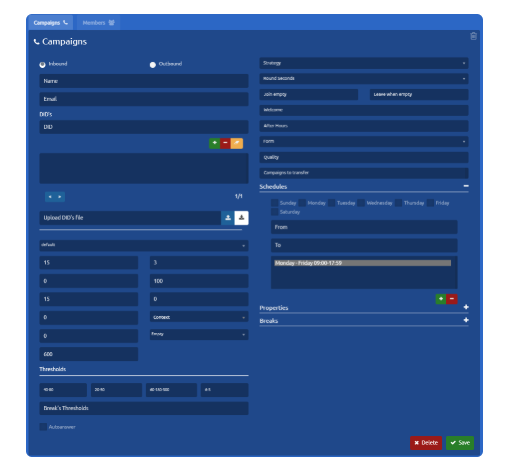
First, we must specify the type of the campaign.
There are two possibilities:
- Inbound — Allows taking calls.
- Outbound — Allows making calls.
## Basic configuration
To create a new voice campaign, you must specify:
- **Name** of the campaign.
- **DID**
- (telephone number) associated with the campaign for identification purposes.
- **Dial String:** provider used on the outbound calls that are dialed manually.
- Only for inbound campaigns.
- **Schedule**
Days of the week and Hours between which the campaign will be available, that is, with agents available to answer calls.
To add a schedule setting:
- Select the Days of the week.
- Set start and end time for selected days.
- Add with the '+' button and our configuration will appear in the list.
- To delete a schedule, we simply select it from the list and press the '-' button.
[](https://docs.cleverideas.ai/uploads/images/gallery/2026-08/5qP6VNEQdPSHDSN6-image.png)
Now our campaign, it's ready to take and make calls.
---
### Form
Here, you can define the Form that is going to be displayed when an Agent is talking to a client (as a pop-up). [Read more about Forms](https://integra-scm.atlassian.net/wiki/spaces/UCEN/pages/407680930 "https://integra-scm.atlassian.net/wiki/spaces/UCEN/pages/407680930").
But it can also be a URL, whose format must be:
- blank:URL — In this way, indicating 'blank:' a new tab will open with the URL after each connected call
- URL|Form Name|true — This way we open the URL in an iframe of uContact, we indicate a name with the first pipe "|" and we enable to close the form with the second.
Example
https:[//www.yourpage.com](https://www.yourpage.com/ "//www.yourpage.com")|FormName|true — This will display a URL in a uContact iframe.
blank:https:[//www.yourpage.com](https://www.yourpage.com/ "//www.yourpage.com") — This will open a browser tab with the indicated URL.
[](https://docs.cleverideas.ai/uploads/images/gallery/2026-08/wc6Mu1rjwNBf3vvG-image.png)
### Audio
If our campaign is **inbound,** we can define different audios.
- **Welcome**
- A welcome message that the clients listens to when contacting the campaign.
- **Out of hours:** Message reproduced when the campaign is out of hours.
- In these cases, we have the Voicemail checkbox. When activated, a voicemail is assigned to the campaign.
- In the displayed box, you must enter the voicemail number.
---
### DID
- If the DID is shorter than 5 numbers, [Flow](https://integra-scm.atlassian.net/wiki/spaces/UCEN/pages/407683035 "https://integra-scm.atlassian.net/wiki/spaces/UCEN/pages/407683035") modifications are necessary. Otherwise, you can contact [Integra Support](https://integra-scm.atlassian.net/servicedesk/customer/portals "https://integra-scm.atlassian.net/servicedesk/customer/portals").
- Every DID corresponds to one campaign.
- You will have more than one phone number for a campaign, joining them with the ampersand (&)
- If you want the same DID for multiple campaigns, [Flow](https://integra-scm.atlassian.net/wiki/spaces/UCEN/pages/407683035 "https://integra-scm.atlassian.net/wiki/spaces/UCEN/pages/407683035") modifications are necessary. Otherwise, you can contact [Integra Support](https://integra-scm.atlassian.net/servicedesk/customer/portals "https://integra-scm.atlassian.net/servicedesk/customer/portals").
---
### Caller ID for outgoing campaigns
The CALLERID can have the following format:
`PREFIX#CALLERID-RANDINI-RANDFIN`
The CALLERID is the only mandatory one.
By placing a prefix before the CALLERID, we indicate that we want to use it if the number to call has that prefix.
File format with different possibilities:
`PREFIX1#CALLERID1-RANDINI-RANDFIN`
`PREFIX2#CALLERID2`
`PREFIX2#CALLERID1-RANDINI-RANDFIN`
`CALLERID3-RANDINI-RANDFIN`
`CALLERID4`
**How do you choose the dialer from the destination number?**
If there are matching prefixes:
- One is chosen at random from among them.
If no matching prefix exists:
- It is randomly chosen among the generics. (Required at least one)
In all cases, **RANDINI-RANDFIN** can be used (they must have the same length).
This generates a random number within this range and concatenates that number to the chosen callerid.
**You can also upload a Caller ID CSV file in the same format as shown above.**
This also applies for [https://integra-scm.atlassian.net/l/c/VpYZtB42](https://integra-scm.atlassian.net/l/c/VpYZtB42)
---
### Breaks
Personalized breaks are defined for the campaign, these breaks will be seen by all the agents associated with it.
- To add a break, Enter the name of the break, Press '+' to add the break (the break is added to the list).
- To delete a break, select it from the list and press '-' to remove it.
When configuring a new campaign of Incoming or Outgoing type, we can find the following parameters:
**Email**
Campaigns email.
**Wrap up**
Time not to send another call after hanging up, allows the agent to finish what he is doing (ex. data entry).
**Service Level**
The threshold to calculate service level. The answered inside the service level in seconds.
**Quality**
Multiple quality models can be adjudicated here.
**Transfer Campaigns**
Campaigns enabled for transfers. If this field is left empty, all voice campaigns will be enabled.
**Thresholds**
This section allows you to set thresholds for monitoring the campaign.
**Record**
Whether record or not incoming calls to the inbound campaigns.
If you want to modify any of the following fields, it is important to understand the concepts and what value you add to your business.
For more information, do not hesitate to consult the following links:
---
### Parameters
**Music on Hold:** Name of the type of music on hold (default: default)
**Timeout:** How much time the agent's phone rings.
**Retry:** How long to wait before trying again to all members (retry configuration does not apply to the leastrecent strategy).
**Max:** Maximum number of people waiting in the campaign line (0 for no limit).
**Weight:** Weight of the campaign, priority.
**Member Delay:** Waiting time that the Agent has before being able to speak to the client or listen to an advertisement.
**Context:** Context so that if something is typed while being in the campaign, to go to this last one.
**Announce Frequency:** How often, in seconds, the audio indicated in Periodic Announce is reproduced (0 is off). Time is taken from the beginning of the audio. For example: if it indicates 20, then every 20 seconds the audio will be reproduced, no matter how long this one is. Take into consideration depending on how long the audio is (it should be shorter than the announced time).
**Periodic Announce:** name of audio to be played from time to time during the wait. It uses the parameter “Announce frequency” to reproduce.
**Auto-Answer:** If checked, calls entering through this campaign will be automatically answered, not letting the agent take his/her time to answer.
**Strategy:**
**Round Seconds:**
Rounds the hold time announcement to the nearest rounding seconds configured in this option.
It controls the value to round to when we announce the caller’s hold time. For example, if the round seconds options is set to 30, instead of saying “1 minute and 23 seconds,” the value would be rounded to the nearest 30-second value, which would result in a prompt of “1 minute and 30 seconds.
Round seconds in 0, 5, 10, 15, 20, or 30 to report the caller.
Join Empty
**Leave When empty:** leave if the campaign is empty.
**Out of time:** Message reproduced when the campaign is out of time.
**Voicemail:** When this box is checked, the campaign gets a voicemail assigned to it with the 4-digit number the user must write. Voicemail details can be found in [Voicemail](https://integra-scm.atlassian.net/wiki/display/UC/a.+Users+v6#a.Usersv6-Voicemail "https://integra-scm.atlassian.net/wiki/display/UC/a.+Users+v6#a.Usersv6-Voicemail").
---
### Properties
**Report Hold Time:** Whether the hold time of the agents needs to be reported or not.
**Timeout Restart:** If selected to true, the timeout an agent has to answer the call is restarted if the actual state is BUSY or CONGESTION. This can be useful if agents are able to cancel a call with reject or similar. Also, when agents return NO ANSWER (ring, no-answer) this also causes the queue to move to the next agent in a round-robin.
**Ring** **in Use:** If it's possible to call an agent that is occupied more than one time.
**Announce Time:** Every how many seconds the campaign position is announced or the waiting time (0 is off).
**Announce Position:** If notify or not the waiting position of the client is in the queue.
**Announce Hold:** If the hold time is announced or not to the client.
**Virtual Hold:** When the client is in the queue waiting to be attended to, and he/she decides to end the call, this one remains under "virtual hold". Later in, when "virtually" is the client's turn, an automatic callback is made to her/him. (Happens with abandoned calls)